get ready to....
TURN YOUR BRAND VISUALS ALL THE WAY UP
Eye Candy is where you turn Canva into conversion fuel.
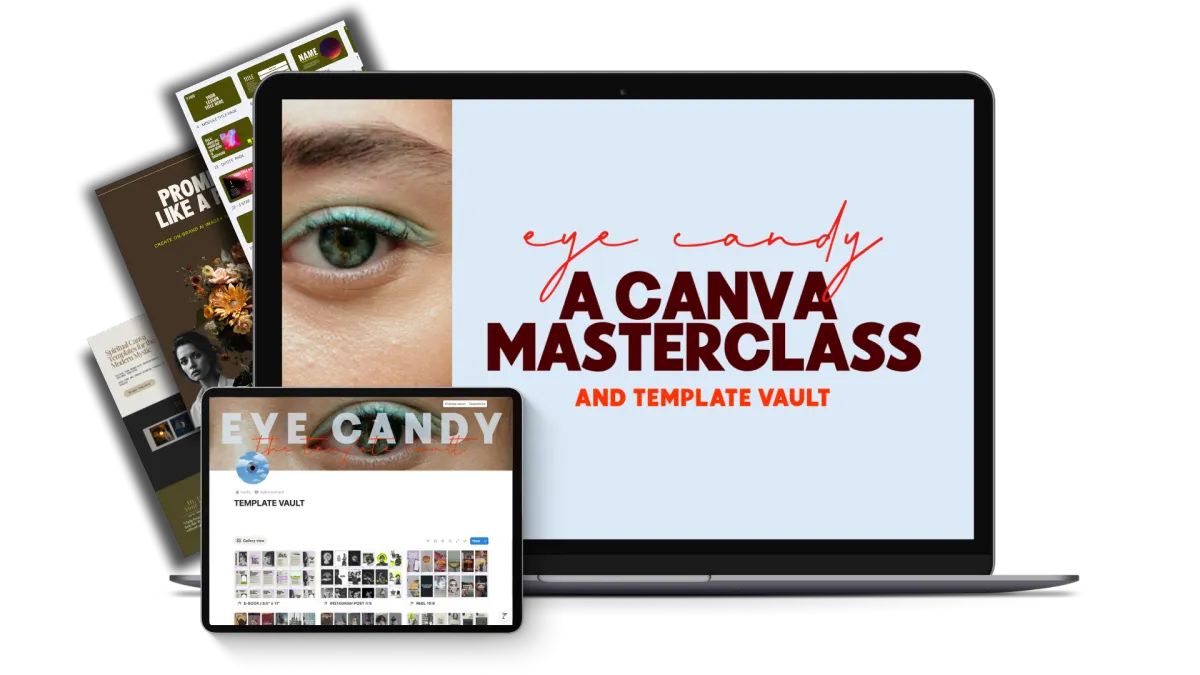
Think you know Canva?
You’ve probably barely scratched the surface.
Eye Candy shows you exactly how to use this "basic" little tool to design scroll-stopping content, digital products, and visuals that look designer-level...without hiring one.
You’ll learn how to:
★ Turn Canva into a skillset that can literally generate you cash
★ Create scroll-stopping graphics without being “a designer”
★ Build a small library of reusable branded templates so you can create faster, with less effort
★ Make content that feels like you, not like “generic online business owner #314”
★ Feel so confident in Canva as a craft that you’ll start to have fun creating for you business.
WHAT’S INCLUDED 👀
Eye Candy Masterclass
6+ hours of bite-size lessons where I take you click by click through exactly how I use Canva to run my business from my laptop and kitchen table.
👉 Build sales pages, mini-sites, and promo graphics
👉 Style brand assets so they feel cohesive and alive
👉 Use design principles to guide the eye, interrupt patterns, and spark curiosity
By the end, you’ll know your way around Canva like someone who actually gets paid to do this, so you can create, edit, and polish your visuals without second-guessing every move.
Template Vault (20+ Customizable Template Sets)
Access to my private stash of Canva templates, including:
👉 Social posts
👉 Sales slide decks
👉 Link In Bio page
👉 Promo graphics
This resource alone is worth well over $300, but inside Eye Candy, it’s simply…part of the deal.
Treat it like your secret stash. Make them your own and let them help your brand grow up.
Prompt Like a Pro Guide (AI Image Creation)
Learn how to prompt for on-brand AI images so you’re not stuck with weird, uncanny stock clones.
You’ll learn:
👉 How to brief tools like Midjourney, Sora, and friends so the output actually looks like your world
👉 How to combine AI images with Canva so they blend seamlessly into your feed
👉 The exact prompt formulas I use for my own visuals
It’s like having your own in-house photographer.
Sales Page Template
I’ll show you how I build entire sales pages directly in Canva, and hand you the exact template so you can:
👉 Drag in your own copy and visuals
👉 Hit publish way faster
👉 Stop waiting on a designer every time you have a new idea to sell
Plug in your words, your offers, your weird little genius, and you’ve got a page that’s ready to take payments.
Two Online Shop Templates
My own shop templates, ready to customize.
I’ll show you how to:
👉 Customize them for your brand
👉 Add your products
👉 Get a simple shop live in just a few hours instead of a few weeks

Canva gets dragged by design purists. Fine. Let them drag.
Anyone who thinks you can’t work magic with this tool can politely 🖕right off.
When you actually know what you’re doing, Canva is more than “that place you make Instagram quotes.” It’s a full-blown business tool that builds visuals that sell.
By the time you’re done playing in this vault, you’ll be able to:
Design your own sales pages, freebies, shops, and social graphics in Canva
Make stock imagery feel custom and intentional (no more “I’ve seen her 14 times today” models)
Integrate video, audio, and animation without breaking your brain
Set up your Brand Kit so everything is faster, more consistent, and less “where did I save that file?”
Actually have fun creating again, instead of treating design like something you “need” to do
Navigate Canva like the person everyone assumes hired a designer
This isn’t a linear “start at module one and don’t you dare skip ahead” course.
Eye Candy is a toolkit.
Dip into the lesson or template you need, when you need it, and get back to running your business.

Hi, I’m Jess, Head Rebel & founder of The Passive Rebel.
I didn’t go to design school. I’ve never used Adobe or Figma.
I opened Canva one day at my kitchen table and started messing around.
At first, I was throwing posts at the feed like everyone else. But I treated it like a lab:
- What made people stop?
- What made their brain do a double-take?
- What made them click through and buy?
Over time, I figured out how to use Canva to build:
👉 Scroll-stopping content
👉 Sales pages and websites
👉 A template membership that brought in around $5K a month, built entirely inside Canva
Now I use Canva for everything in my business.
It’s given me more creativity, more joy, and a skill I can use in both business and life.
Eye Candy is me handing you the keys to that castle and talking you through exactly how I do it, click by click.
QUICK Q’S BEFORE YOU UPGRADE
Do I have to have Canva Pro?
Short answer: No, but you’ll want it.
Eye Candy is built on Canva Pro, because that’s what I use every day.
If you’re on the free plan, you’ll still be able to learn the process + apply most of it, but some templates and features will be Pro-only. Think of Pro as the difference between “this works” and “ohhh, this slaps.”
And honestly? Canva Pro has been one of the easiest “yeses” in my business. Not only is it an investment in your business, it’s an investment in you.
It’s given me so much joy in creating, and that joy pays you back every time you sit down to make something and it actually looks how it feels in your head.
I’m not “techy.” Will I be able to follow along?
If you can open a browser and click a mouse, you’re good.
You’re literally watching over my shoulder while I click around inside Canva. There will be no “and then the magic happens” jump cuts, I promise.
I show you where to go, what to press, and what to ignore.
How much time will this take?
The masterclass is just over 6 hours, broken into short, binge-or-sip lessons.
You don’t have to treat it like a Netflix marathon. Dip in when you’re building something specific, steal what you need, go back to your life. This is “open Canva, play, experiment,” not “lock yourself in a cave for a weekend.”
Is this just… more templates I’ll never touch?
Absolutely not.
Yes, you get templates (over $300 worth). But more importantly, you get my brain on how to use them.
I walk you through how to tweak, break, and remix every element so your stuff stops looking like everyone else’s and actually feels like you.
What happens after I buy?
You’ll get instant access to the vault, templates, and trainings. You can start with the quick wins (like setting up your Brand Kit or customizing a sales page) and build from there, or watch my freestyle an entire set if Instagram templates (and yes, they're included in the Vault)
Ready to turn you content into Eye Candy?
You’ve already invested in the strategy and the story.
Eye Candy is where you give your brand the face it deserves.
$147
© 2026 The Passive Rebel, LLC. All rights reserved.
Disclaimer:
The Passive Rebel, LLC is an independent entity and is not affiliated with, endorsed by, or connected to Facebook, Inc., Instagram, Meta Platforms, Inc., or any of their subsidiaries. Facebook and Instagram are registered trademarks of Meta Platforms, Inc. All products, services, and content provided by The Passive Rebel, LLC are independently owned and operated.
Earnings Disclaimer:
Any income or earnings examples shared by The Passive Rebel, LLC are for educational and illustrative purposes only. We make no guarantees of results or financial success. Your results will vary based on your own efforts, skills, market conditions, and factors outside of our control. We do not promise, guarantee, or imply that you will earn any money using our strategies or systems. This is not a “get-rich-quick” scheme — success requires work, consistency, and personal responsibility.
Refund Policy:
Due to the digital nature of our products, all sales made with The Passive Rebel, LLC are final and non-refundable. When you purchase, you receive immediate access to valuable content and materials that cannot be returned. Please review the product details carefully before purchasing, and reach out with any questions if you need clarity before committing.